AI Photo to Cartoon
Turn Any Image into Cartoon Art — Free Online, No Signup
Transform Your Photo into Cartoon
Upload your photo and choose your favorite cartoon style
Upload your photo
or drag and drop your image here
Support JPG, PNG, WEBP (max 10MB)
Photo to Cartoon Examples
Turn real photos into cartoon art — see the before and after transformation
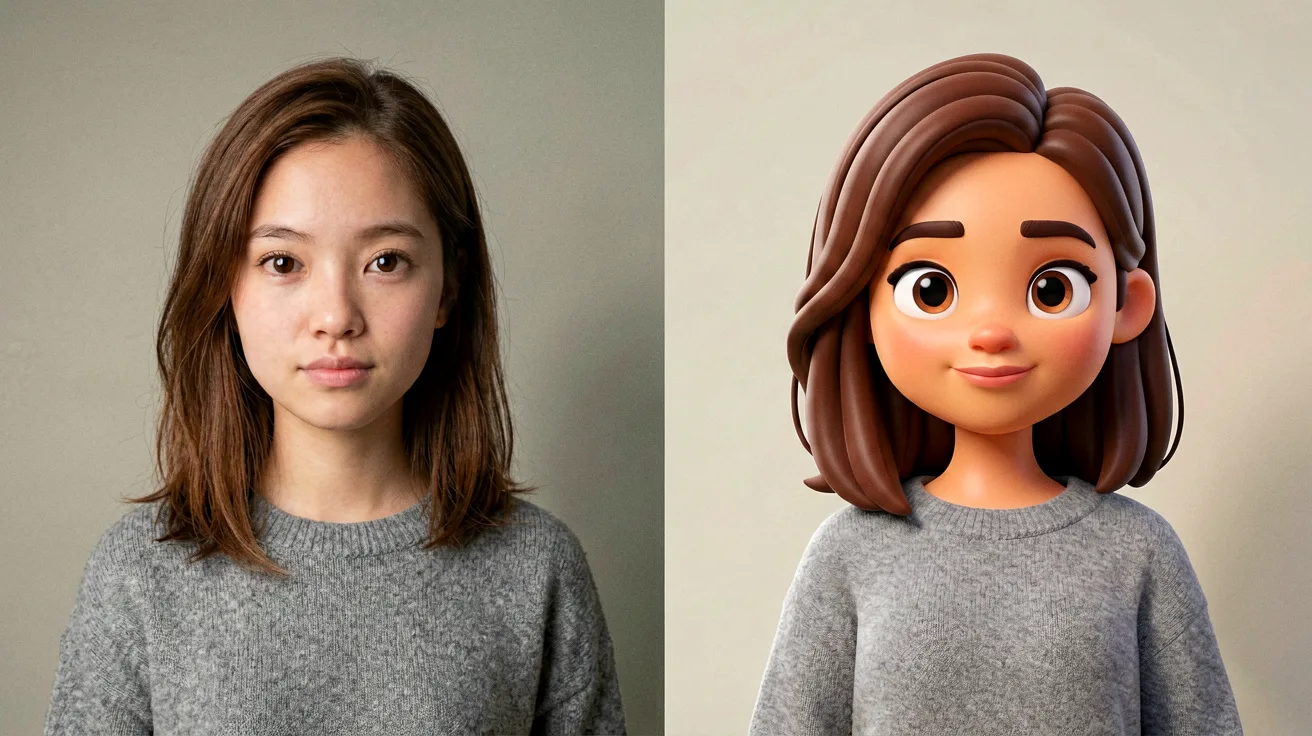
Get Started: Transform Images in 3 Simple Steps
Our photo to cartoon converter makes it incredibly easy to create stunning artwork
1. Upload Your Image
Upload the photo you want to transform into cartoon style
Supports JPG, PNG, WEBP up to 10MB
2. Pick Your Favorite Style
Select from 9 different cartoon styles including Ghibli, Anime, Kawaii
Each style has unique characteristics
3. Generate & Download
Click generate and watch AI transform your photo into cartoon
Usually completes in 10-30 seconds
4. Save Your Artwork
Download your cartoon image in high quality
No watermark, completely free
Available Cartoon Styles
Ghibli
Blocky
Realistic Art
Chinese Ink
Cartoon
Classic
Kawaii
Minimalist
Chibi
Choose Your Perfect Cartoon Style
Explore our photo to cartoon style guide to find the ideal look for your image
Each cartoon style creates a unique artistic transformation. Use this guide to select the perfect photo to cartoon effect for your project.
Ghibli
Dreamy Anime Aesthetics
Soft, hand-drawn look inspired by Studio Ghibli films. Perfect for creating whimsical, fantasy-style portraits with gentle colors and dreamlike quality.
Best For:
Fantasy portraits, soft artistic photos, romantic imagery
Features:
Blocky
Retro Pixel Art Style
Nostalgic 8-bit and 16-bit pixel art aesthetic. Ideal for gaming enthusiasts and retro-themed content with bold, blocky pixels.
Best For:
Gaming avatars, retro designs, pixel art fans
Features:
Realistic Art
Painterly Realism
Transforms photos into detailed oil painting style artwork. Maintains realistic proportions while adding artistic brushwork and depth.
Best For:
Portraits, artistic photos, professional presentations
Features:
Chinese Ink
Traditional East Asian Art
Elegant sumi-e and ink wash painting style. Creates sophisticated black and white artwork with traditional Chinese artistic elements.
Best For:
Artistic portraits, cultural content, minimalist designs
Features:
Cartoon
Bold Animated Style
Classic cartoon aesthetic with bold outlines and vibrant colors. Creates eye-catching, animated-style artwork that stands out.
Best For:
Social media content, fun avatars, playful designs
Features:
Classic
Vintage American Cartoon
Timeless 1950s animation style with warm, nostalgic appeal. Perfect for creating retro-inspired cartoon artwork.
Best For:
Vintage themes, nostalgic content, classic illustrations
Features:
Kawaii
Cute Japanese Aesthetic
Adorable big-eye style with pastel colors and cute proportions. Creates irresistibly cute cartoon versions of any photo.
Best For:
Cute avatars, kawaii fans, pastel aesthetic
Features:
Minimalist
Clean Modern Design
Simple, clean lines with flat design aesthetics. Creates contemporary cartoon art with minimal visual clutter.
Best For:
Modern profiles, clean designs, professional use
Features:
Chibi
Super Deformed Cuteness
Exaggerated small proportions with oversized heads and expressive features. Creates fun, playful cartoon characters.
Best For:
Fun avatars, playful content, character designs
Features:
Not sure which style to choose? Try multiple styles to see which photo to cartoon transformation best suits your vision!
Expert Tips for Stunning Photo to Cartoon Results
Get the most out of your photo to cartoon conversion with these professional recommendations
Follow these tips from our design team to achieve amazing photo to cartoon results every time.
Optimal Lighting Matters
Use photos with good, even lighting. Avoid harsh shadows or overexposed areas for the best photo to cartoon transformation.
Good lighting helps our AI capture details accurately and apply cartoon effects more precisely.
Start with High Resolution
Upload the highest resolution image available. Higher resolution inputs produce sharper, more detailed photo to cartoon outputs.
More image detail means the AI can create better-defined cartoon elements and cleaner lines.
Clear Subject Focus
Choose photos with a clear, well-defined subject. Portraits with the person centered and visible work best for photo to cartoon.
A focused subject allows the AI to apply cartoon style more effectively to the main elements.
Simplify Busy Backgrounds
Photos with simpler or solid backgrounds generally produce cleaner photo to cartoon results.
Cluttered backgrounds can distract from the main subject in cartoon transformations.
Ensure Face Visibility
For portrait-style photo to cartoon conversions, make sure faces are clearly visible and not obstructed.
Visible facial features help the AI create accurate and appealing cartoon characterizations.
Experiment with Styles
Don't limit yourself to one style! Different photos work better with different photo to cartoon styles.
Each style emphasizes different artistic elements, so testing multiple options yields the best results.
Pro Tip
Pro Tip: For group photos, try the Cartoon or Minimalist styles. For solo portraits, Kawaii and Chibi often produce adorable results!
The Dream AI Photo to Cartoon Advantage
Discover what makes our photo to cartoon technology the preferred choice for creators worldwide
9 Distinctive Artistic Styles
From dreamy Ghibli to adorable Chibi, find your perfect photo to cartoon aesthetic among our diverse collection
Zero Cost, Zero Hassle
Generate unlimited cartoon artwork completely free without watermarks, signups, or hidden fees
Premium Quality AI Processing
Our advanced photo to cartoon algorithms preserve essential details while creating stunning artistic transformations
Creative Applications for Your Cartoon Art
Explore the many ways creators use our photo to cartoon tool for their projects
Digital Identity & Social Presence
Craft memorable cartoon avatars that make your social media profiles, gaming accounts, and messaging apps stand out from the crowd
Content Creation & Marketing
Elevate your digital content with eye-catching cartoon illustrations perfect for blogs, videos, presentations, and promotional campaigns
Personalized Art & Gifts
Create unique, heartfelt cartoon portraits as memorable gifts for friends, family, or to commemorate special occasions
Your Questions About Photo to Cartoon Answered
Quick answers to help you get the most from our photo to cartoon converter
How does the AI photo to cartoon converter work?
Our AI analyzes your photo's structure, colors, and key features, then applies artistic cartoon effects while preserving important details like facial expressions and main elements. The entire photo to cartoon process happens in seconds.
Which cartoon style should I choose?
Each photo to cartoon style has unique characteristics. Ghibli creates dreamy anime aesthetics, Kawaii produces cute big-eye looks, while Cartoon offers bold animated style. Check our Style Comparison Guide above to find your perfect match!
Is this photo to cartoon tool really free?
Our photo to cartoon tool is completely free with generous daily limits. There are no hidden costs or premium paywalls - create as many cartoon images as you need without spending a cent.
What photo specifications work best?
For optimal photo to cartoon results, use high-resolution JPG, PNG, or WebP images under 10MB with good lighting and clear subjects. See our Tips section for detailed recommendations.
How quickly can I turn a photo into a cartoon?
Most photo to cartoon transformations complete within 10-30 seconds. Processing time varies based on image size and complexity, but our optimized AI ensures fast delivery.
Can I use my cartoon artwork commercially?
Absolutely! All photo to cartoon images you create belong to you 100%. Use them for personal projects, commercial campaigns, social media, or any purpose without attribution or restrictions.
Is my data safe when using photo to cartoon?
Yes, your privacy is our priority. All uploaded images are processed securely and are automatically deleted after processing. We never share your photos with third parties or use them for training without your consent.
Do I need to install any software?
No installation required! Our photo to cartoon tool is 100% web-based and works directly in your browser. Access it from any device - PC, Mac, tablet, or smartphone - without downloading anything.
Does photo to cartoon work with group photos?
Yes! Our photo to cartoon AI handles group photos and full-body shots beautifully. For best results with multiple people, use well-lit photos where all faces are clearly visible. The Cartoon and Minimalist styles work particularly well for group images.
Can I transform pet photos into cartoons?
Definitely! Pets make adorable cartoon subjects. Our photo to cartoon tool recognizes animal features and creates charming cartoon versions of your furry friends. Try Kawaii or Chibi styles for especially cute pet cartoons!
Is the photo to cartoon tool mobile-friendly?
Yes! Our tool is fully optimized for mobile devices. Whether you're using a smartphone or tablet, you can upload photos, select styles, and generate cartoon artwork with the same ease as on a desktop computer.
What if I'm not satisfied with the result?
Not happy with your photo to cartoon result? Try adjusting the input photo (better lighting, clearer subject) or experiment with different cartoon styles. Each style produces unique results, and small changes to your input can make a big difference in the output quality.