AI Draw to Image Generator
Transform Your Simple Sketches into Stunning Artwork
Draw or Upload Your Sketch
Create on canvas or upload an existing sketch, then choose your style
0/500
Transform Your Sketches into Beautiful Art
Watch how AI turns simple flower drawings into stunning, detailed illustrations in seconds.
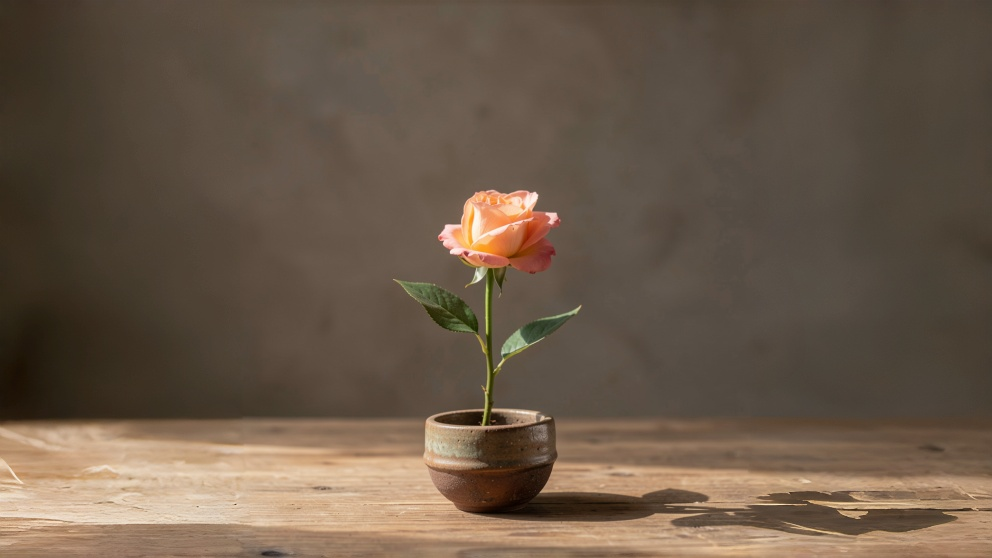
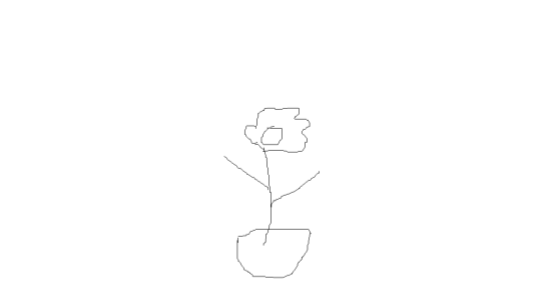
Transform Sketches to Art in 4 Simple Steps
Our AI draw to image generator makes artistic creation effortless
Draw or Upload
Sketch your idea on our canvas or upload an existing drawing
Choose Style
Select from realistic, anime, cartoon, 3D render, watercolor, or digital art
Set Ratio
Pick your preferred aspect ratio like 1:1, 16:9, or 9:16
Generate & Download
Click generate and download your polished artwork in seconds
What Is an AI Draw to Image Generator?
Understanding the technology that transforms sketches into art
Definition
An AI Draw to Image Generator is a tool that converts simple sketches, doodles, or hand-drawn outlines into fully rendered images using artificial intelligence. Instead of describing an image with text, users draw a rough sketch, and the AI interprets the shapes, structure, and composition to generate a realistic, artistic, or stylized image.
Example Transformations
- •A stick-figure sketch of a cat → AI generates a detailed cat illustration
- •A rough outline of a house → AI generates a realistic architectural render
- •A doodle of a sneaker → AI generates a product-style shoe image
How It Works
This technology is powered by diffusion models or multimodal generative AI, which combine visual understanding and image generation. The AI analyzes the structure of your sketch—such as object shapes, spatial layout, perspective, and composition—then fills in the missing details automatically.
Unlike text-to-image tools that rely solely on written prompts, draw-to-image gives you direct control over the visual structure and composition of your image.
Why Choose AI Draw to Image?
Discover the advantages that make draw-to-image the preferred choice for creators
More Intuitive Than Prompt Writing
Many users struggle with prompt engineering. Drawing is often more natural than describing complex visual ideas in words. Instead of writing 'a small house on the left with a tree behind it and a road in front,' simply sketch the layout.
Faster Creative Workflow
Designers and creators can rapidly test ideas without spending hours on detailed illustrations. Sketch quickly and let AI finish the rendering. Perfect for brainstorming, prototyping, and concept design.
No Drawing Skills Required
Even people who cannot draw well can create high-quality images. The AI fills in details automatically, making professional-looking artwork accessible to everyone regardless of artistic ability.
Better Layout Control Than Text-to-Image
Text prompts often produce random compositions. Draw-to-image allows you to direct the structure of the image, control object placement, character poses, scene layout, and perspective. This makes the output more predictable and aligned with your vision.
AI Draw to Image Generators make visual creation faster, easier, and more accessible than traditional design methods or pure text-to-image tools.
Problems We Solve
Challenges that existed before AI draw-to-image technology
Text-to-Image Was Hard to Control
With traditional text-to-image tools, users had to rewrite prompts repeatedly, adjust keywords, and regenerate many times. Even then, the layout might still be wrong, leading to frustration and wasted time.
Manual Illustration Takes Time
To convert an idea into a visual image, users needed to draw manually, use Photoshop or Illustrator, and spend hours refining details. For beginners, the learning curve was steep and the process time-consuming.
Designers Needed Advanced Skills
Creating professional images required drawing skills, design knowledge, and digital art software. Non-designers struggled to produce good visuals, forcing businesses to hire professionals for simple visual tasks.
Idea Visualization Was Slow
For brainstorming or concept development, teams had to describe ideas verbally, search for reference images, or hire artists. This slowed down the creative process and made rapid iteration difficult.
AI Draw to Image eliminates these barriers by transforming simple sketches into professional artwork in seconds, making visual creation accessible to everyone.
Powerful Draw to Image Features
Everything you need to transform sketches into stunning visuals
Built-in Drawing Canvas
Draw directly in your browser with adjustable brush size and eraser tools. No need for external software—just open and create.
Upload Existing Sketches
Already have a drawing? Upload it and let AI transform it into art. Supports JPG, PNG, and WebP formats up to 25MB.
Structural Control
Unlike pure text-to-image tools, draw-to-image gives users control over layout and composition. You can control object placement, character poses, scene layout, and perspective. This makes the output more predictable and aligned with your vision.
Works with Rough Drawings
Even extremely simple sketches work great. AI can generate coherent images from stick figures, circles, rough outlines, and scribbles. Focus on structure, not artistic quality.
Multiple Style Options
Choose from photorealistic, anime, cartoon, 3D render, watercolor, concept art, digital art, and many more. Experiment with different styles instantly.
Instant Generation
Get your transformed image in seconds with our optimized AI processing. Most generations complete within 10-30 seconds.
Application Scenarios
Discover how different industries use AI draw-to-image generators
Designers
Create concept art and visual prototypes. Rapidly test design ideas before committing to detailed work.
Game Developers
Sketch characters or scenes and generate game assets. Great for concept art, character design, and environment visualization.
Architects
Turn rough building sketches into realistic renders. Visualize architectural concepts and present ideas to clients effectively.
Content Creators
Create illustrations and social media graphics. Generate unique visuals for Instagram, TikTok, YouTube thumbnails, and more.
Students
Visualize ideas for presentations or projects. Great for education, demonstrating concepts, and creative learning exercises.
Product Designers
Sketch product ideas and instantly generate realistic visuals. Perfect for sneaker design, furniture concepts, and electronic device prototypes.
Storyboarding
Sketch scenes and generate storyboard visuals. Plan camera angles, scene composition, and character positions for videos and films.
Fashion Designers
Sketch clothing ideas and instantly generate fashion visuals. Explore clothing styles, fabric textures, and runway concepts quickly.
Example Sketches & Prompts
See how combining sketches with prompts creates amazing results
Cat Portrait
Sketch:
Outline of a cat sitting on a chair
Prompt:
a fluffy orange cat sitting on a wooden chair, soft lighting, realistic photography
Countryside House
Sketch:
Simple house and trees
Prompt:
cozy countryside house surrounded by trees, warm sunset lighting, cinematic style
Futuristic Sneaker
Sketch:
Sneaker outline
Prompt:
futuristic running sneaker design, white and neon blue, product photography, studio lighting
Fantasy Character
Sketch:
Simple character outline
Prompt:
cute cartoon astronaut floating in space, vibrant colors, Pixar-style illustration
💡 Tip: Combine your sketch with a descriptive prompt for best results. Describe the style, lighting, mood, and any specific details you want to see.
Frequently Asked Questions
Answers to common questions about our AI sketch to image generator