Nano Banana: The Complete Guide to Google's AI Image Editor
Nano Banana: The Complete Guide to Google's AI Image Editor
In August 2025, Google quietly released an AI image editing tool that would soon take social media by storm. Originally known by its codename "Nano Banana," this technology—officially called Gemini 2.5 Flash Image—has rapidly become one of the most talked-about AI image generation and editing models in the world.
What makes Nano Banana different? Unlike previous AI tools that focused primarily on generating images from scratch, Nano Banana excels at precise image editing while maintaining remarkable consistency across multiple iterations. Whether you're changing backgrounds, swapping clothing, or creating character-consistent artwork across dozens of images, Nano Banana delivers results that feel less like AI generation and more like working with a skilled human editor.
In this comprehensive guide, we'll explore everything you need to know about Nano Banana: what it is, how it works, why it went viral, real user feedback, practical prompt examples, and how you can start using it today.
Understanding Nano Banana
What Exactly is Nano Banana?
Nano Banana is Google's AI image generation and editing model, developed through DeepMind and Google AI teams. The name "Nano Banana" was actually the project's internal codename during testing, but it stuck—now most users refer to it by this memorable name rather than its official designation: Gemini 2.5 Flash Image.
According to Wikipedia, Nano Banana is specifically designed as the image generation and editing component within Google's Gemini family of AI products.
Key Timeline:
- August 2025: Official public release
- November 2025: Nano Banana Pro launched (corresponding to Gemini 3 Pro Image)
Key Features at a Glance
Nano Banana offers a comprehensive suite of image manipulation capabilities:
- Text-to-Image Generation: Create original images from text descriptions
- Image Editing: Modify image content including backgrounds, portrait styles, and objects
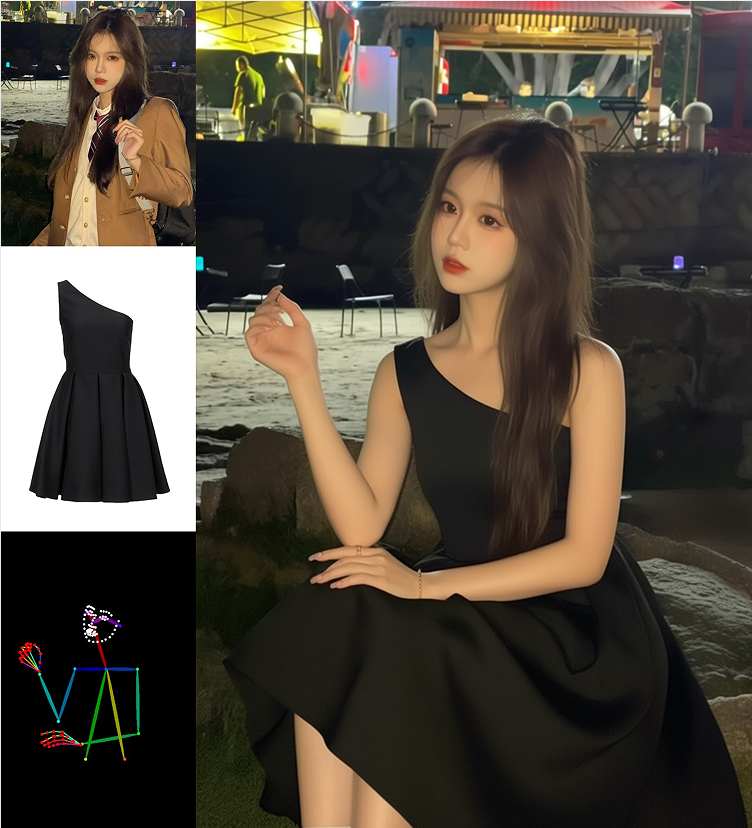
- Multi-Image Fusion: Seamlessly combine multiple images into one composition
- Strong Character Consistency: Maintain consistent appearance across multiple editing rounds—a feature that Business Weekly highlights as one of its strongest capabilities
- Native Integration: Built directly into Gemini App, Google AI Studio, and other Google services
Nano Banana Pro: The November 2025 Upgrade
In November 2025, Google released Nano Banana Pro, which corresponds to the Gemini 3 Pro Image model. According to the official Gemini overview, the Pro version offers:
- Higher quality image generation
- Improved text rendering capabilities
- Better handling of complex scenes
- Optimized for professional creative work and infographic generation
Why Nano Banana Went Viral
The viral success of Nano Banana isn't just about clever marketing—it addresses specific pain points that plagued earlier AI image editing tools. Let's break down why it captured so much attention, so quickly.
The "One-Sentence Edit" Revolution
The Old Problem: Before Nano Banana, AI image editing commonly resulted in:
- Altered facial features
- Distorted body proportions
- Unpredictable style drift
The Nano Banana Difference: When you tell Nano Banana "only change the background," it genuinely changes only the background. As we noted in our analysis, this level of precision represents a qualitative leap in user experience for casual users.
Unmatched Character Consistency
In the AI community, maintaining consistent character appearance across multiple generations has historically been extremely difficult. Nano Banana achieves this by preserving:
- Facial features and structure
- Hairstyles and overall appearance
- Character essence and proportions
This capability directly fueled viral trends including:
- Outfit swap images: Users generating the same character in different clothing
- Sequential storytelling: Creating narrative sequences with consistent protagonists
- IP character creation: Developing consistent mascots and avatars
- Meme and expression pack generation: Maintaining character identity across emotional variations
The social media virality of these content types explains Nano Banana's rapid rise in popularity.
Editing Over Generation: Meeting Real User Needs
Many users don't want to create images from scratch—they want to modify existing ones. Nano Banana's focus on image editing rather than pure text-to-image generation directly serves:
- Content creators and social media managers
- Graphic designers
- E-commerce businesses
- Everyday users editing personal photos
This strategic focus on editing over generation sets it apart from tools like Midjourney, which prioritize pure creation.
Native Google Ecosystem Integration
Nano Banana isn't a standalone tool requiring sign-ups and learning curves. It's integrated into:
- Gemini App: Direct access for consumers
- Google AI Studio: Professional playground for developers
- Upcoming Google products: Planned expansion across the Google ecosystem
This integration means users can start using Nano Banana immediately without additional learning overhead, contributing to its rapid adoption.
Getting Started: How to Use Nano Banana
For Regular Users (Recommended Path)
Method 1: Via Gemini Web or Mobile App
This is currently the most popular and accessible method.
Step-by-Step Process:
-
Open Gemini (web version or mobile app)
-
In the model selector, choose a model that supports image generation/editing (typically labeled Gemini Image/Flash Image—this is Nano Banana)
-
For image generation, enter a prompt like:
Generate a cyberpunk-style cat with neon lighting background, cinematic lighting -
For image editing, first upload an image, then enter modification instructions like:
Change the background to Tokyo night scene while keeping the person's face unchanged
Key Characteristics of this Method:
- Chinese language support is excellent
- No complex parameters required
- Ideal for entertainment, design, and illustration purposes
Popular Editing Workflows
1. Background Replacement & Style Changes
Example Prompts:
Transform this photo into Ghibli anime style
Change the background to snow mountains while maintaining the person's pose and expression
2. Multi-Image Fusion
Process:
- Upload 2-3 images
- Use prompts like:
Place the person from the first image into the scene from the second image, with unified style
3. Sequential Editing (Character Consistency)
This is where Nano Banana truly shines:
Keep this character unchanged and generate photos of them in different seasons
Multiple rounds of editing maintain character stability without "face-swapping" issues that plague other tools.
For Developers: Google AI Studio
For programmers and technical users, Google AI Studio provides:
- Access to Gemini Image/Flash Image models
- Playground environment for testing prompts and image uploads
- Direct API code generation for integration
Common Use Cases:
- Automated product image generation
- AI-powered poster creation
- Content illustration at scale
- Game and app asset generation
Prompt Engineering Best Practices
The Winning Formula
Based on extensive testing, effective prompts for Nano Banana follow this structure:
[Subject] + [Style] + [Details] + [Image Quality]
Example:
A detective in a trench coat, rainy night street, cyberpunk style, cinematic lighting, high detail
Example Prompts by Category
1. Basic Photo Editing (Essential for Beginners)
Background Swap (Most Reliable):
Change the background of this photo to a city skyline at sunset,
keep the person's face, hairstyle, pose, and clothing completely unchanged,
natural lighting, realistic photo style
Key Success Factors:
- Explicitly state "keep unchanged"
- Don't just write "change background"—be specific
Clothing Color/Style Changes:
Change this person's jacket to a dark blue trench coat,
maintain consistent facial features, body type, and lighting,
realistic fabric texture, not cartoonish
Photo Quality Enhancement (Without Content Changes):
Without altering the person or composition,
improve overall clarity and texture quality,
make the photo look like professional photography
2. Stylization (Most Popular on Social Media)
Photo to Animation/Illustration:
Transform this photo into Ghibli animation style,
preserve the person's facial features and expressions,
soft colors, hand-painted texture
Convert this photo to high-quality Japanese manga illustration style,
clean lines, clear colors, simple background
Cinematic/Premium Feel:
Keep the person unchanged,
change overall style to cinematic image,
cold tone lighting, shallow depth of field, realistic style
3. Multi-Round Editing (Nano Banana's Strength)
Step-by-Step Refinement:
Round 1:
Change the background to a night street, rainy
Round 2:
While keeping the person and background unchanged,
add streetlamp reflections and raindrop effects
Round 3:
Adjust overall tone slightly cooler for more cyberpunk atmosphere
Critical Tip: Don't write everything at once. Step-by-step editing yields the highest stability.
4. Character Consistency (Scene Changes)
Keep this person completely consistent,
generate a photo of them in a cafe,
natural light, realistic photography style
Keep the same person,
generate a photo of them in front of snow mountains,
wearing a thick coat, realistic proportions
5. Multi-Image Composition (Advanced)
Person + Scene Synthesis:
Use the person from the first image,
place them into the scene from the second image,
unified lighting direction, consistent style
E-Commerce Product Images:
Keep product appearance unchanged,
change background to clean white photo studio,
soft lighting, premium e-commerce style
Generate display images of the same product in different holiday scenes,
maintain consistent product proportions and details
Common Pitfalls to Avoid
These Prompt Patterns Fail:
- "Make it look a bit better" (Too vague)
- "Randomly change to premium style" (Lacks specificity)
- "Both realistic and cartoon and oil painting" (Conflicting directives)
The Golden Rule: Nano Banana performs poorly with vague prompts and conflicting instructions.
The Universal Formula for Stable Outputs
[What to change] + [What to keep unchanged] + [Style/Quality] + [Constraints]
Template:
Change [A] to [B],
keep [C] completely unchanged,
style is [D], natural and realistic effect
Real User Feedback: The Good and The Bad
Based on user discussions and media coverage from sources including Zhiyuan Community, Sina Finance, and U.OSU, here's what real users are saying.
What Users Love
Excellent for Small-Scale Edits
Multiple reviews and tests indicate that Nano Banana:
- Achieves "only change specified objects without destroying other parts" better than earlier tools
- Performs well on small changes like clothing color swaps and accessory additions
- Completes many basic editing tasks faster than traditional Photoshop
- Delivers a significantly more practical experience than traditional Gemini image editing
Strong Character Consistency
As reported by Business Weekly, this capability is rare in the AI field and directly fuels viral content trends.
Common Complaints
Output Inconsistency
Numerous Reddit users report:
- Model frequently outputs the original image without changes
- Requires repeated attempts and prompt adjustments to achieve desired results
- Sometimes completes only one instruction while ignoring others in multi-part requests
Quality Limitations
User feedback includes:
- Lower image quality, especially reduced resolution from higher-resolution originals
- Poor results in some scene transformations and complex edits
- Occasional output errors (not following instructions for detail changes) requiring multiple iterations
High Prompt Sensitivity
Many users discovered:
- More detailed prompts work significantly better
- Poor prompts lead to unchanged images or misunderstood instructions
- Some describe it as "like an assistant with poorly written prompts"
Pro Version Controversy
Among paid users:
- Reports that Pro output quality has declined (sometimes below expectations)
- Pro sometimes automatically switches back to standard mode, making the paid experience feel not worthwhile
Overall Verdict
General Users: "Fun and useful, but not perfect"
Professional Users: More critical, acknowledging potential but noting it requires experimentation and adjustment
Summary of Pros:
- Easy to use, convenient, good performance on basic editing tasks
- Fast generation with some degree of local control
- Very popular for social sharing and casual use
Summary of Cons:
- Unstable: Sometimes output is unchanged, repetitive, or misunderstands instructions
- Quality lacking in some scenarios, especially high-resolution/complex editing
- High dependency on prompt quality, requiring prompt-writing skills
Technical Insights (For the Curious)
Core Architecture
One-Sentence Core Principle:
Nano Banana isn't an "image drawing AI"—it's a multimodal understanding + conditional generation + fine-grained control image model.
1. Multimodal Transformer Foundation
Nano Banana belongs to the Gemini family of multimodal Transformers, characterized by:
- Simultaneous understanding of:
- Text (prompts)
- Images (pixels + structure)
- Multi-round context
- Completing "understand → reason → generate" in a single model
This differs fundamentally from older approaches that used separate models for image understanding and image generation.
2. Images Are "Conditioned," Not "Overwritten"
This is Nano Banana's most critical technical innovation.
It uses mechanisms conceptually similar to:
- Original image as strong conditioning
- Processing images through:
- Structural encoding (character contours, object positions)
- Semantic segmentation (face, clothing, background, etc.)
- Generation only allows:
- Changes in permitted regions/semantic layers
- Other parts are "locked"
When you say "only change background, don't touch the face," it's genuinely limiting variable regions in the computation graph, not just "trying to draw it similarly."
3. Why Character Consistency Is So Strong
Rather than "re-imagining a person" each time, Nano Banana:
- Treats character identity as a persistent condition
- Preserves across multiple editing rounds:
- Facial embeddings
- Pose and proportions
- Local feature constraints
This essentially creates image-level "context memory"—critical for continuous creative work, IP development, and outfit swapping.
4. It's an "Image Editing Model," Not Pure Text-to-Image
| Aspect | Nano Banana | Traditional Generation Models |
|---|---|---|
| Core Goal | Edit images | Draw new images |
| Original Image Status | Strong condition | Optional |
| Control Granularity | Regional level | Global level |
| Multi-round Stability | High | Low |
Overall Technical Framework (Abstract Structure)
Input:
- Text instructions
- Original image (optional)
- Multi-round context

↓ Multimodal Encoding (Gemini)

↓ Image Semantic Segmentation + Structural Understanding

↓ Conditional Diffusion/Generation (Restricted Regions)

↓ Output Image
The focus isn't on "drawing artistically"—it's on:
"Precisely edit what you tell it to"
Ideal Use Cases
General Users
What You Can Do:
- Change backgrounds
- Edit photos
- Play with stylization (anime, oil painting, cinematic effects)
Why It's Suitable:
- No prompt engineering required
- Works with natural Chinese expressions
- High success rate
Content Creators and Social Media Managers
Typical Uses:
- Reusing character images repeatedly
- Video thumbnails
- Memes and viral content
- Sequential story illustrations
Advantages:
- Character doesn't drift
- Fast image generation
- No need to redraw from scratch
E-Commerce, Marketing, and Design
Application Scenarios:
- Product background replacement
- Multi-region asset variations
- Model outfit swaps
- Holiday promotional posters
Particularly Friendly For: "Batch + Consistency" requirements
Product Managers and Entrepreneurs
Potential Applications:
- AI photo editing tools
- User avatar generation
- Social app outfit changing features
- Automated poster generation
Key Benefits:
- Strong controllability
- Less likely to generate "unusable images"
Programmers and Developers
Suitable Systems:
- Automated image processing pipelines
- UGC image enhancement
- Game character asset generation
- CMS and content platforms
Why It Works:
- No model training required
- Clean API thinking
- More stable than pure diffusion models
What It's NOT Suitable For (Honest Assessment)
- Pure artistic creation
- Extreme style exploration
- Completely generative world-building
- Strong composition control (like ControlNet)
Nano Banana pursues "usability" > "artistic limits"
Frequently Asked Questions
Q1: Why Does It Sometimes Ignore My Edit Requests?
Problem Manifestation:
- Prompt clearly states "change background" but returns completely identical image
- AI says "completed" but image has no changes
Possible Causes & Solutions:
- Prompt too vague → Need more detailed, specific descriptions
- Multi-round editing accumulated errors → Try breaking down tasks step by step
- Model output instability → Can press retry or try different phrasing
Pro Tip: Break desired effects into clear actions (e.g., "change background to autumn forest, softer lighting") rather than abstract descriptions.
Q2: Why Are Output Images Sometimes Blurry or Low Quality?
Manifestation:
- Output image has lower clarity than original
- Edges appear blurry
- Pixelation upon enlargement
Causes & Solutions:
- Low-quality original upload → Try using higher-resolution images first
- Default export settings too low → Check if output resolution can be increased
- Cloud compression affecting details → If advanced settings available, choose higher "quality" options
Q3: What If Character Details Change After Multiple Edits?
The Problem:
- Facial features or characteristics change across multiple edits of the same character
Why This Happens:
- AI generates content by understanding images—each "brain" isn't exactly the same, so accumulated small changes can lead to inconsistent final results
Improvement Methods:
- Use "always maintain consistent reference image" as input
- Edit step-by-step, don't stack many changes at once
Q4: Why Is Processing Sometimes Very Slow?
Possible Causes:
- High-resolution images or complex changes → Recognition and rendering processes take longer
- Peak server congestion → Network request processing delays increase
Quick Optimizations:
- Appropriately reduce image size or reduce single-edit complexity
- Wait a bit before retrying during delays (server load may fluctuate)
Q5: Why Does Quality Vary Greatly with Identical Prompts?
The Reason:
- Model is affected by server status, computational strategy adjustments, etc., potentially causing unstable results from the same prompt
Suggestions:
- Try submitting the same prompt multiple times
- Fine-tune phrasing: e.g., change "make lighting warmer" to "adjust lighting to sunset soft-light style"
Q6: Why Does Text Sometimes Display Incorrectly in Images? (Text Rendering Issues)
Early versions sometimes generated misspelled text in images, such as "WELCME" instead of "WELCOME."
Tips:
- For text in images, use short, accurate prompts
- Complex long sentences are more likely to error
Q7: Do Safety Restrictions Prevent Processing Certain Requests?
Yes. For responsibility and safety restrictions, editing of sensitive content or elements potentially involving privacy/violations will be automatically blocked by the system, potentially causing it to refuse requests or return original images.
Recommendation: Avoid clearly violating prompts or potentially infringing on others' privacy.
Q8: Can I Custom-Train Styles or Brand Consistency?
No. Current Nano Banana doesn't support user model training for style customization (unlike some specialized commercial models that can run repeatedly with a single brand/style).
Q9: Why Do Some Websites Claim Nano Banana Online but Might Be Scams?
Many unofficial websites use "Nano Banana" name to sell services or credits—these are typically third-party, not Google official.
How to Judge:
- Official Google Gemini built-in tools are the safest entry point
- Before unknown sites require paid credits, verify the source
Quick Reference Table
| Problem | Frequency | Solution Approach |
|---|---|---|
| Doesn't follow prompts to edit | ⭐⭐⭐⭐ | Clearer prompt, multi-step breakdown |
| Image blur | ⭐⭐⭐ | Increase resolution and output settings |
| Identity inconsistency | ⭐⭐ | Maintain reference images |
| Slow processing | ⭐⭐ | Simplify tasks / retry off-peak |
| Same prompt instability | ⭐⭐ | Multiple attempts or fine-tune phrasing |
| Text rendering errors | ⭐⭐ | Use concise, clear prompts |
| Safety blocked | ⭐⭐ | Avoid sensitive content |
| Third-party scam sites | ⭐ | Only trust official services |
Comparison with Alternatives
| Feature | Nano Banana | Midjourney | DALL·E |
|---|---|---|---|
| Editing Capability | ⭐⭐⭐⭐⭐ | ⭐⭐ | ⭐⭐⭐ |
| Character Consistency | ⭐⭐⭐⭐⭐ | ⭐⭐ | ⭐⭐ |
| Ease of Use | ⭐⭐⭐⭐⭐ | ⭐⭐ | ⭐⭐⭐ |
| Chinese Support | ⭐⭐⭐⭐ | ⭐ | ⭐⭐⭐ |
| Entertainment Spreadability | ⭐⭐⭐⭐ | ⭐⭐⭐ | ⭐⭐⭐ |
The Bottom Line:
Nano Banana isn't the "most artistic" image generator—it's the most practical.
Conclusion
Nano Banana's essence is an "AI editor that understands images," not "an AI that can draw."
It uses multimodal Transformers + strong conditional generation to solve the old problems of "inaccurate image editing" and "unstable character consistency."
Summary:
- What it is: Google's Gemini 2.5 Flash Image—specialized in image generation and editing
- Why it went viral: Solved real pain points with precise editing and unmatched character consistency
- Best for: Practical editing tasks requiring precision, multi-round consistency, and ease of use
- Not ideal for: Pure artistic creation or extreme composition control
Final Thought:
Nano Banana represents the first time "AI photo editing" feels natural, stable, and genuinely useful—like working with a real human assistant.
Additional Resources
Official Channels
- Gemini App: gemini.google - Direct access to Nano Banana capabilities
- Google AI Studio: Developer playground for API access and testing
- Official Overview: Gemini Image Generation
Video Tutorials and Demos
Google Nano Banana Pro Latest AI Drawing Tool | Zero-Threshold Demo (Doctor AI)
- Demonstrates actual AI image generation and editing workflows
- Shows simple prompts and generation examples
Nano Banana Model Revealed! Did Google AI Win Again? (Bilibili Demo Version)
- Explains and demonstrates Nano Banana's image editing capabilities
- Chinese subtitles available
- Popular for effects demonstration sections
Other Recommended Videos:
- Gemini 2.5 Flash Image Demo & Tutorial - Hands-on demonstration in AI Studio/Gemini, showing precise editing and character consistency
- Nano Banana Tutorial – Generate + Edit + Composite Images - Detailed teaching on prompt writing and multi-image composition
- Nano Banana Full Feature Deep Analysis & 27 Examples - Case-by-case demonstration, ideal for learning detailed prompt writing and common usage patterns
- Short Video Demonstrations (1-Second Photo Editing / Quick Examples) - Many short clips show "1-second AI editing / background replacement" with intuitive usage scenarios
How to Find More Demo Videos: Search on YouTube or Bilibili for:
- "Nano Banana Gemini 2.5 Flash Image Tutorial"
- "Nano Banana Usage Demo" / "Nano Banana demo"
- "Google Gemini Image Editing Demo"
Reference Sources
- Wikipedia: Nano Banana
- Business Weekly: Nano Banana Complete Guide
- Android Authority Reviews
- Reddit Community Discussions
- U.OSU Educational Coverage
Ready to try Nano Banana?
You don't need to navigate through Google's complex interfaces. Our website's AI Image Editor is built directly on the Nano Banana model, bringing you powerful multi-image editing capabilities with a seamless user experience.
Choose Your Plan:
| Plan | Features | Best For |
|---|---|---|
| Free Mode | Basic image editing, background swaps, style transfers | Casual users, trying out features |
| Premium Mode | High-resolution exports, advanced multi-image fusion, batch processing, priority rendering | Content creators, e-commerce, professional use |
Why Use Our AI Image Editor?
- Nano Banana Powered: Leverages Google's Gemini 2.5 Flash Image model for precise, character-consistent edits
- Multi-Image Fusion: Seamlessly combine multiple images with unified lighting and style
- No Prompt Engineering Required: Intuitive interface—just upload and describe what you want
- Instant Results: Fast processing powered by cutting-edge AI infrastructure
Have questions or want to share your creations? Our community is actively sharing prompts, results, and techniques. Join the conversation and see what's possible with Nano Banana!